Minimum stock alerts
Main → Settings → Minimum Quantity
Running out is the one inventory mistake customers notice. Give each item a Minimum quantity — the level below which it counts as running low — and the app takes it from there: colored warnings in the list, a reorder report, and notifications.
-
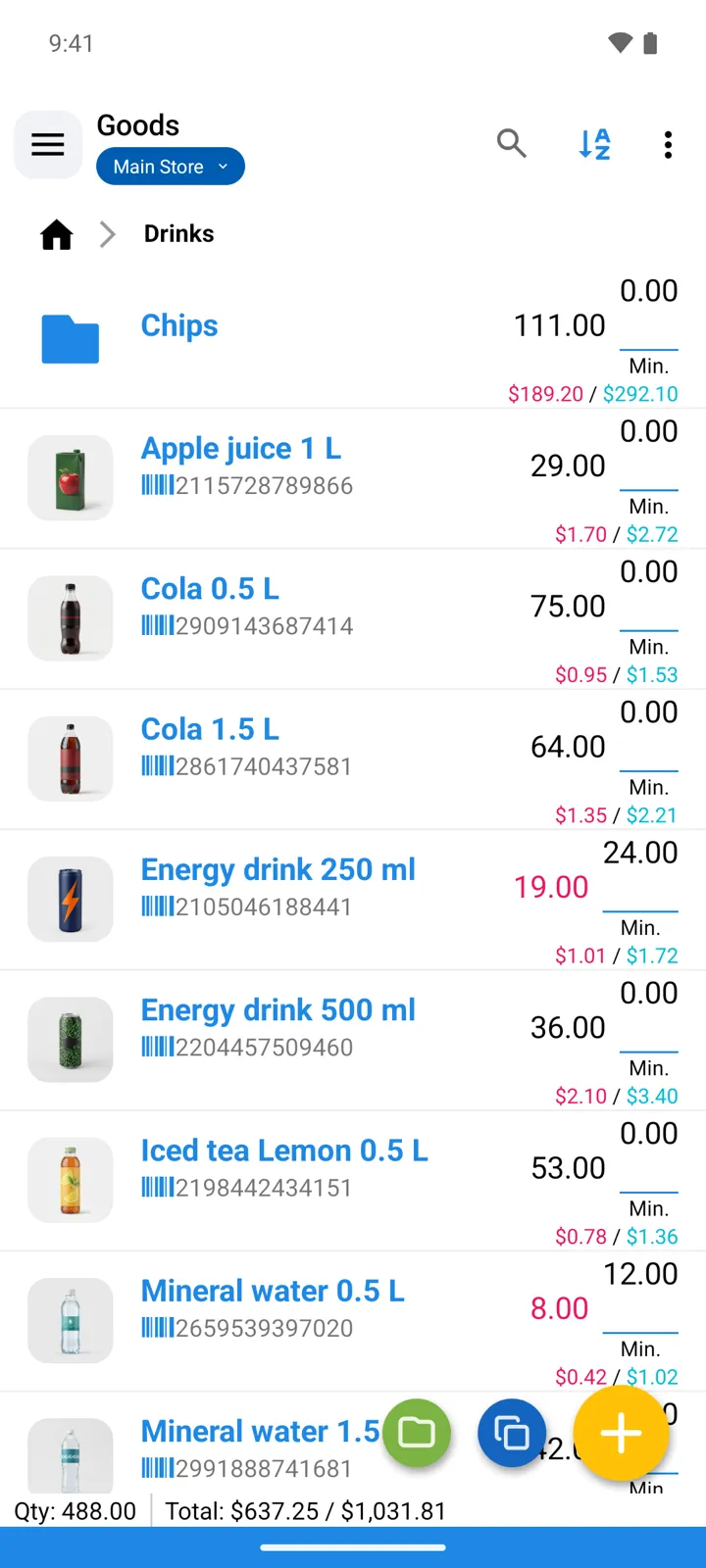
Switch the field on. In Settings → Minimum Quantity, enable Show “Min.Quantity” in item’s screen — and, if you want the threshold visible in the catalog, Show “Min.Quantity” in list of Goods.
-
Set the level per item: the Minimum quantity field in the item form. Importing from Excel? There’s a column for it.
-
Watch the list. Items at or below their minimum are highlighted in the Goods list — the color is yours to pick (Color for goods needing reorder). The list’s ⋮ menu can Show Min.Quantity alongside the stock.
-
Let the app watch instead: turn on Show Low Stock Alerts and set the Periodic check interval in hours (0 - instantly). When something drops below its minimum you get a notification — “Low Stock Level Alert! Check it now”.
-
When it’s time to buy, open the Reorder Report — every item below its minimum, with a Reorder column for how much is missing — reports reference.
Good to know
Section titled “Good to know”- No minimum set means no alerts for that item — zero is not a threshold.
- A goods group can carry a Minimum quantity of its own (in the group’s settings): the check then watches the group’s total — handy when any variant will do, like keeping 50 batteries across all brands.
- The Excel settings map a Minimum quantity column, so thresholds can be maintained in a spreadsheet along with everything else.