Profiles and permissions
Main → Settings → Profiles
A profile is a named set of permissions. Every user of your database works under one, and the two settings on their card divide the job: Access to Stores decides where they work, their Profile decides what they may do there.
The built-in Admin
Section titled “The built-in Admin”A freshly added user gets the Admin profile, and the app is upfront about it: “You have created the user with Admin profile. This profile has almost full access rights. To limit user’s access rights you should create your own Profile and assign it to user!” — which is exactly the workflow: create a profile per role (Seller, Storekeeper), switch the user’s card to it.
The profile editor
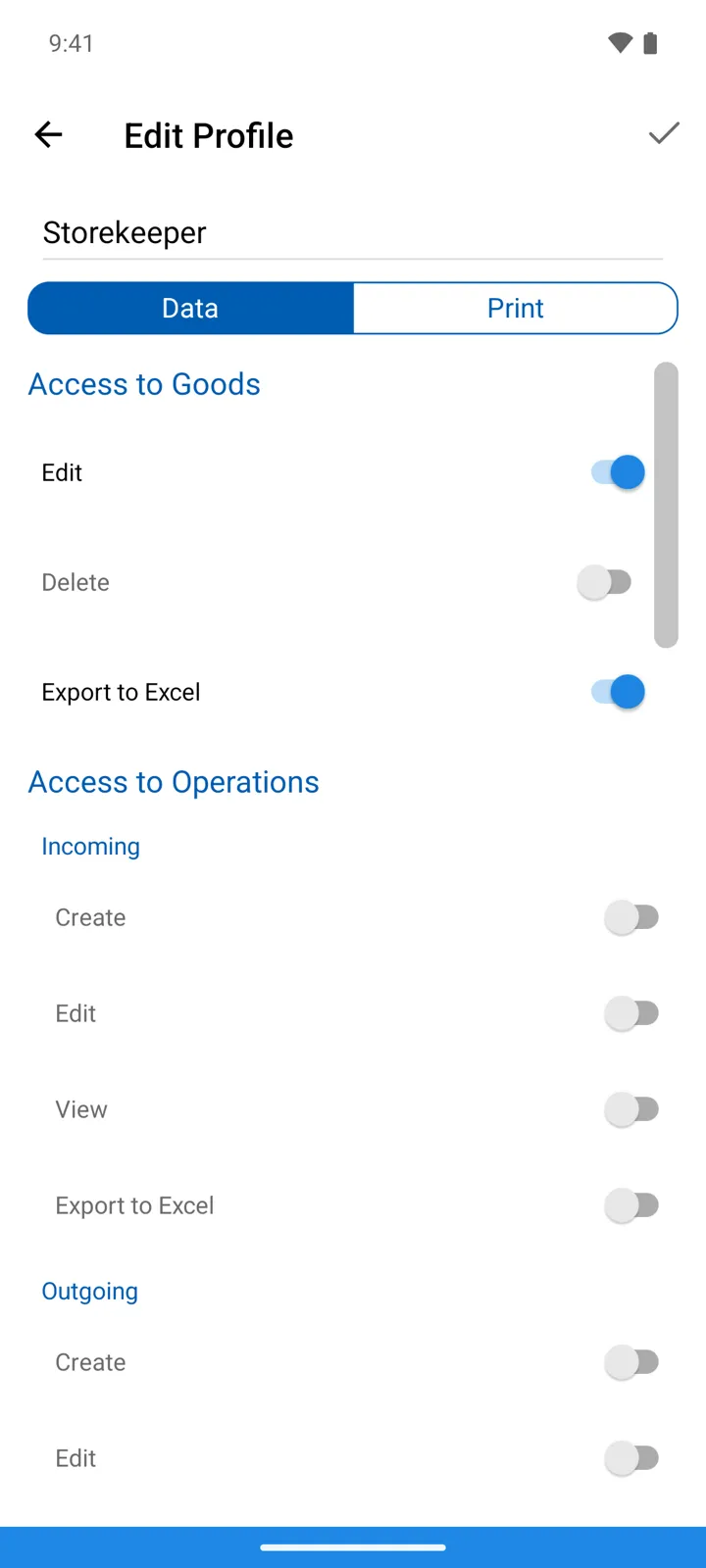
Section titled “The profile editor”Settings → Profiles → + (or tap a profile). Give it a name, then switch between the editor’s two tabs: Data is what the profile may see and do, Print holds Access to print templates — a per-template list of what this profile may print with.
The Data tab, top to bottom — each section a group of on/off permissions:
| Section | Permissions |
|---|---|
| Access to Goods | Edit · Delete · Export to Excel — the catalog itself is visible to everyone with store access. |
| Access to Operations | Per type — Incoming, Outgoing, Stock-taking, Transfer, Customer return, Supplier return — each with Create · Edit · View, and Export to Excel where the type exports. |
| Access to Reports | View · Export to Excel |
| Access to Expenses | View · Edit |
| Access to Prices | Purchase price: View only — show it or hide it. Selling price: View · Edit. |
| Access to Suppliers / Access to Customers | Edit · View · Export to Excel |
The app simply hides what a profile denies: without View on Stock-taking a user never sees counts in the journal; without Create on Outgoing the sale button isn’t offered; without View on a price the price fields — and with them the payment state button — disappear from operations.
Good to know
Section titled “Good to know”- A profile that’s in use is protected: “You can’t delete the profile assigned to users! Operation canceled!” — move the users to another profile first.
- Prices deserve a thought: Purchase price → View off means a seller can’t see what you pay for goods — margins stay private.
- Store visibility is per user (their card’s Access to Stores), not per profile — two storekeepers can share a profile yet see different stores.
- The database owner isn’t limited by profiles — the full toolset, including this screen, is always theirs.